
Pool Salt Cell Not Producing Chlorine? Here’s How to Fix It
Your saltwater pool looks cloudy, the chlorine test reads zero, and your salt cell appears to be running normally. What gives? A pool salt cell not producing chlorine is one of the most frustrating problems saltwater pool owners face — especially when everything seems fine on the surface.
Quick answer
Pool Salt Cell Not Producing Chlorine? Here's How to Fix It: Your saltwater pool looks cloudy, the chlorine test reads zero, and your salt cell appears to be running normally. What gives? A pool salt cell not producing chlorine is one of the most frustrating problems saltwater.
The good news? Most causes are fixable without replacing the cell entirely. And even better news: you can usually diagnose the problem in under 30 minutes with the right approach.
Quick Answer
If your salt cell isn’t producing chlorine, check these five things first:
- Salt level — Must be 2700-3400 ppm (test independently, don’t trust the control panel)
- Cell cleanliness — Calcium buildup blocks chlorine production
- Water temperature — Most cells shut off below 60°F (15°C)
- pH level — High pH (above 7.8) dramatically reduces cell efficiency
- Cell age — Cells last 3-7 years or 10,000 hours, then they’re done
If your salt reads correct on the panel but chlorine still isn’t generating, the problem is almost always calcium scale, incorrect pH, or a cell nearing end-of-life.
Why Your Salt Cell Stopped Making Chlorine
Salt chlorine generators work through electrolysis. Water passes over metal plates coated with ruthenium or iridium. Electrical current splits dissolved salt (sodium chloride) into chlorine gas, which immediately dissolves into your pool water as hypochlorous acid — the stuff that actually sanitizes.
When this process fails, chlorine production stops. But the system often keeps running like nothing’s wrong. That’s why you can have a salt cell that looks operational while your pool turns into a swamp.
Here’s what actually causes the breakdown:
Calcium Scale Buildup on the Plates
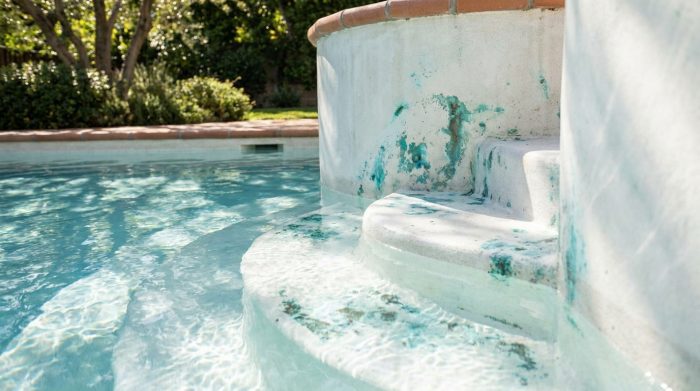
This is the number one culprit. Hard water deposits calcium carbonate on the cell’s metal plates over time. A thin layer reduces efficiency. A thick layer stops production completely.
You can often see scale buildup by removing the cell and looking inside. White, chalky deposits on the plates? That’s your problem.
How fast scale builds depends on:
- Your calcium hardness level (ideal: 200-400 ppm)
- How often you run acid washes
- Whether your cell has a reverse-polarity feature
Salt Level Is Actually Low
Here’s where pool owners get tricked: your control panel’s salt reading isn’t always accurate. These readings drift over time. A panel showing 3200 ppm might actually be measuring 2400 ppm in reality.
Salt cells need a minimum of 2700 ppm to function properly. Most work best between 3000-3400 ppm. Drop below the threshold, and the cell either reduces output dramatically or shuts off entirely.
The fix? Always verify salt levels with independent test strips or take a water sample to your pool store. Don’t add salt based solely on what the panel says.
Use our salt calculator to determine exactly how much salt you need once you’ve confirmed the level is low.
Water Temperature Too Cold
Most salt cells have a low-temperature cutoff between 50-60°F (10-15°C). This is a safety feature — electrolysis becomes inefficient and potentially damaging to the cell in cold water.
If you’re opening your pool in early spring or closing late in fall, this catches many owners off guard. The cell appears to run, but it’s actually in a standby mode.
Check your owner’s manual for the specific cutoff temperature. Some Hayward cells stop at 50°F. Some Pentair models cut off at 60°F. Knowing your model’s threshold saves troubleshooting headaches.
pH Is Too High
This one’s sneaky. Your cell might be producing chlorine just fine, but high pH makes that chlorine nearly useless.
At pH 7.2, about 66% of your chlorine is in the active form (hypochlorous acid). At pH 8.0, only 21% is active. Same chlorine production, dramatically different sanitizing power.
But it gets worse. Saltwater pools naturally push pH upward. The electrolysis process itself generates sodium hydroxide (lye), which raises pH constantly. If you’re not adding acid regularly, your pH can climb into the 8.0+ range within a week.
Target pH: 7.2-7.6 — check it twice weekly and adjust with muriatic acid as needed. Our pH calculator shows exactly how much acid to add.
Stabilizer (CYA) Level Problems
Cyanuric acid protects chlorine from UV destruction. Without it, sunlight destroys 90% of your chlorine within 2 hours. With proper levels, chlorine lasts all day.
The problem? Both too little AND too much CYA causes issues:
- Below 30 ppm: Chlorine burns off faster than your cell can produce it
- Above 80 ppm: Chlorine becomes less effective at killing algae and bacteria
Target CYA: 70-80 ppm for saltwater pools (higher than traditional pools because salt cells produce chlorine continuously)
Check your stabilizer levels if chlorine won’t hold despite a functioning cell.
The Cell Is Simply Worn Out
Salt cells don’t last forever. Expect 3-7 years depending on usage, maintenance, and water chemistry. Most manufacturers rate cells for approximately 10,000 hours of operation.
When a cell reaches end-of-life, production gradually decreases until it stops entirely. The plates become corroded, the coating wears thin, and no amount of cleaning restores function.
Signs your cell is dying:
- Chlorine production has been declining for months
- You’re running the cell at 100% output but still can’t maintain 1-3 ppm free chlorine
- Cleaning doesn’t improve production
- The cell is more than 5 years old
If you’ve ruled out everything else, it’s probably time for a replacement salt cell. Match the replacement to your pool’s gallon capacity — undersized cells wear out faster.
Step-by-Step Troubleshooting Guide
Work through these steps in order. Each one eliminates a potential cause.
Step 1: Test Salt Level Independently
Don’t trust the control panel. Use salt test strips or bring a water sample to a pool store.
What you’re looking for: 2700-3400 ppm
If salt is low: Calculate the correct amount using our salt calculator, then add pool salt slowly around the pool’s perimeter with the pump running.
If salt tests correct: Move to step 2. Don’t add more salt — excess salt can damage your cell and corrode pool equipment.
Step 2: Inspect and Clean the Cell
Turn off the pump. Remove the cell from its housing. Look inside.
What you’re looking for: White, flaky, or chalky deposits on the metal plates
Cleaning process:
- Mix a 4:1 solution of water to muriatic acid in a plastic bucket (always add acid to water, never water to acid)
- Place the cell in a cleaning stand or cap off one end
- Fill with the acid solution until plates are submerged
- Let soak for 5-15 minutes — you’ll see bubbling as scale dissolves
- Rinse thoroughly with a garden hose
- Repeat if heavy scale remains
Important: Don’t scrape or scrub the plates. You’ll damage the coating and shorten cell life.
Step 3: Check Water Temperature
Look at your pool thermometer or the control panel’s temperature reading.
If water is below 60°F: Your cell is likely in cold-water standby. This is normal. Wait for warmer weather or consider a pool heater if you swim year-round.
If water is above 60°F: Temperature isn’t your problem. Move to step 4.
Step 4: Test and Adjust pH
Test pH with a reliable kit or test strip.
If pH is above 7.6: Add muriatic acid to bring it down. Use our pH calculator for the exact amount.
Target: 7.2-7.4 is ideal for saltwater pools
Retest after 4 hours of circulation. pH adjustments take time to stabilize.
Step 5: Verify CYA Level
Test cyanuric acid with a separate test (not all test strips include CYA).
If CYA is below 30 ppm: Add stabilizer. About 13 ounces raises 10,000 gallons by 10 ppm.
If CYA is above 100 ppm: The only fix is partial drain and refill. Dilution is the solution.
Target: 70-80 ppm for saltwater pools
Check proper levels with our stabilizer calculator.
Step 6: Check Cell Voltage and Amperage
If you’ve ruled out all the above, the cell itself may be failing.
Many control panels display cell voltage and amperage. Compare to your owner’s manual specifications.
Signs of a dying cell:
- Low amperage despite proper salt levels
- Cell runs but produces minimal chlorine
- Error codes related to cell function
Step 7: Run a Temporary Chlorine Supplement
While troubleshooting, your pool still needs sanitation. Add liquid chlorine or granular shock to maintain free chlorine between 1-3 ppm until you’ve resolved the salt cell issue.
This prevents algae blooms while you diagnose and fix the problem.
Maintaining Your Salt Cell for Maximum Lifespan
Prevention beats troubleshooting. These habits extend cell life significantly:
Inspect Monthly
Pull the cell out once a month during swim season. Quick visual checks catch scale buildup early when it’s easy to remove.
Clean Every 3-4 Months
Don’t wait for problems. Regular acid washes (quarterly in hard water areas, twice yearly in soft water) keep plates clean and efficient.
Keep pH Low
Higher pH accelerates scale formation. Keeping pH at 7.2-7.4 instead of 7.6-7.8 dramatically reduces calcium deposits on your cell.
Run the Cell at Lower Output
Running your cell at 50-60% output extends its lifespan compared to running at 100%. If you need 100% output to maintain chlorine, something else is wrong — usually low salt, high pH, or insufficient runtime.
Balance Calcium Hardness
Keep calcium between 200-400 ppm. Higher levels mean faster scale buildup. Lower levels can damage your pool surface, but they’re easier on the cell.
When to Replace Your Salt Cell
If you’ve cleaned the cell, balanced your water chemistry, and production still won’t recover, the cell has reached end-of-life.
Replacement makes sense when:
- Cell is more than 5 years old
- You’ve cleaned twice with no improvement
- Control panel shows cell errors
- Maximum output can’t maintain 1-3 ppm chlorine
- Visible plate damage or coating loss
Before buying a replacement:
- Confirm your pool’s volume in gallons
- Match the cell capacity to your pool (or go slightly larger)
- Ensure compatibility with your existing control panel
Some systems require brand-specific cells. Others work with universal replacements. Check your owner’s manual before ordering.
Frequently Asked Questions
Why does my salt cell show chlorine production but my pool has no chlorine?
Two likely causes: either your pH is too high (making the chlorine ineffective even though it exists), or your CYA level is too low (sunlight is destroying chlorine faster than the cell produces it). Test pH and CYA independently. Target pH 7.2-7.4 and CYA 70-80 ppm for saltwater pools.
How often should I clean my salt cell?
Every 3-4 months in areas with hard water (above 300 ppm calcium hardness). Every 6 months in soft water areas. Monthly inspections help you catch buildup before it becomes a problem.
Can I run my salt cell in cold water?
Most cells have a low-temperature cutoff between 50-60°F. Below this threshold, the cell enters standby mode and stops producing chlorine. This is a safety feature — don’t try to override it. Supplement with liquid chlorine during cold weather if you need sanitation.
How do I know if my salt cell needs replacement?
If cleaning doesn’t restore production, the cell runs but chlorine stays at zero, or the cell is over 5 years old with declining output, replacement is likely needed. Most cells last 10,000 hours or 3-7 years depending on water chemistry and maintenance.
My control panel shows correct salt but production is still low — what’s wrong?
Control panel salt readings drift over time and become inaccurate. Always verify salt level with independent test strips before assuming salt is correct. If independent testing confirms adequate salt (2700-3400 ppm), the problem is usually scale buildup, high pH, or a cell approaching end-of-life.
Get Your Pool Chemistry Right
Troubleshooting a salt cell is easier when your overall water chemistry is dialed in. Use our free pool calculator app to calculate exact chemical doses for your pool’s size and current readings. No guesswork, no overdosing, no wasted money.
The app helps you:
- Calculate exact salt additions
- Dial in pH adjustments
- Balance stabilizer levels
- Track chlorine demand
Stop staring at confusing test results. Get precise chemical calculations in seconds →
As an Amazon Associate, Pool Chemical Calculator earns from qualifying purchases. Lowers high pH and helps bring alkalinity down when used carefully. Useful for algae cleanup, cloudy water, high bather load, and weekly oxidation routines. Raises free chlorine quickly without adding stabilizer, which is useful when CYA is already high.Recommended pool supplies


Get exact pool chemical doses
Pool Chemical Calculator turns your test readings, pool volume, and target levels into exact treatment amounts for chlorine, pH, alkalinity, calcium, stabilizer, salt, and more.
Open the Pool Chemical Calculator app for iOS, Android, or web.